Normalize: Difference between revisions
Raffriff42 (talk | contribs) formatting, links, phrasing |
Raffriff42 (talk | contribs) m one more touch-up |
||
| Line 1: | Line 1: | ||
<div style="max-width:62em" > | <div style="max-width:62em" > | ||
Raises (or lowers) the loudest | Raises (or lowers) the loudest peak of the audio track to a given {{FuncArg|volume}}. This process is called [[Wikipedia:Audio_normalization|''audio normalization'']].<br> | ||
Note that '''Normalize''' performs [[Wikipedia:Audio_normalization#Peak_normalization|''peak normalization'']] (used to prevent audio [[Wikipedia:Clipping_(audio)#Digital_clipping|clipping]]) and not [[Wikipedia:Audio_normalization#Loudness_normalization|loudness normalization]]. | |||
==== Syntax and Parameters ==== | ==== Syntax and Parameters ==== | ||
| Line 7: | Line 7: | ||
|Normalize(clip ''clip'' [, float ''volume'' , bool ''show'' ] ) | |Normalize(clip ''clip'' [, float ''volume'' , bool ''show'' ] ) | ||
}} | }} | ||
:{{Par2|clip |clip|}} | |||
::Source clip. Supported [[ConvertAudio|audio sample types]]: 16-bit integer and [[Float|32-bit floating-point]]. | |||
::Other sample types (8-, 24- and 32-bit integer) are converted to floating-point automatically. | |||
:{{Par2|volume|float|1.0}} | :{{Par2|volume|float|1.0}} | ||
::Set the amplitude of the loudest audio peak. Default = 1.0 | ::Set the amplitude of the loudest audio peak. Default = 1.0 for peaking at 0[[Wikipedia:DBFS|dB]]: for [[Float|32-bit floating-point]] audio, this corresponds to the range -1.0 to +1.0, and for for 16-bit integer audio, this this corresponds to the range -32768 to +32767 – the widest range possible without [[Wikipedia:Clipping_(audio)#Digital_clipping|clipping]]. | ||
::For a particular decibel level, use the equation {{FuncArg|volume}} = {{Serif|10}}<sup> {{Serif|'''dB''' / 20}}</sup> | ::*For a particular peak [[Wikipedia:Decibel|decibel]] level, use the equation {{FuncArg|volume}} = {{Serif|10}}<sup> {{Serif|'''dB''' / 20}}</sup> | ||
::For example, set a -3dB peak with {{FuncArg|volume}} = 10<sup>-3/20</sup> or 0.7079. | ::*For example, set a -3dB peak with {{FuncArg|volume}} = 10<sup>-3/20</sup> or 0.7079. | ||
::Where multiple audio channels are present, all channel gains are set in proportion. For example, if the loudest peak on the loudest channel comes to -10dB, by default a gain of +10dB is applied to all channels. | ::*Where multiple audio channels are present, all channel gains are set in proportion. For example, if the loudest peak on the loudest channel comes to -10dB, by default a gain of +10dB is applied to all channels. | ||
:{{Par2|show|bool|false}} | :{{Par2|show|bool|false}} | ||
::If ''true'', a text overlay (see image below) will show the | ::If ''true'', a text overlay (see image below) will show the calculated amplification factor and the frame number of the loudest peak. | ||
==== ''Normalization and Floating-point Audio'' ==== | |||
The idea of digital ''clipping'' (when the signal is outside the range that can be stored accurately) really applies only to ''integer'' sample types; floating-point values will never clip in practice, as [[Wikipedia:Single-precision_floating-point_format|their limit]] is around 3.4×10<sup>38</sup> – some 29 orders of magnitude larger than 16bit. | |||
'''Normalize''' is therefore not needed for floating-point audio, but using it is recommended before [[ConvertAudio|converting]] to an integer type, especially if any processing has been done, such as [[Amplify|amplification]], [[MixAudio|mixing]] or [[SuperEQ|equalization]]. | |||
==== Examples ==== | ==== Examples ==== | ||
Revision as of 00:36, 24 February 2016
Raises (or lowers) the loudest peak of the audio track to a given volume. This process is called audio normalization.
Note that Normalize performs peak normalization (used to prevent audio clipping) and not loudness normalization.
Syntax and Parameters
Normalize(clip clip [, float volume , bool show ] )
- clip clip =
- Source clip. Supported audio sample types: 16-bit integer and 32-bit floating-point.
- Other sample types (8-, 24- and 32-bit integer) are converted to floating-point automatically.
- float volume = 1.0
- Set the amplitude of the loudest audio peak. Default = 1.0 for peaking at 0dB: for 32-bit floating-point audio, this corresponds to the range -1.0 to +1.0, and for for 16-bit integer audio, this this corresponds to the range -32768 to +32767 – the widest range possible without clipping.
- For a particular peak decibel level, use the equation volume = 10 dB / 20
- For example, set a -3dB peak with volume = 10-3/20 or 0.7079.
- Where multiple audio channels are present, all channel gains are set in proportion. For example, if the loudest peak on the loudest channel comes to -10dB, by default a gain of +10dB is applied to all channels.
- Set the amplitude of the loudest audio peak. Default = 1.0 for peaking at 0dB: for 32-bit floating-point audio, this corresponds to the range -1.0 to +1.0, and for for 16-bit integer audio, this this corresponds to the range -32768 to +32767 – the widest range possible without clipping.
- bool show = false
- If true, a text overlay (see image below) will show the calculated amplification factor and the frame number of the loudest peak.
Normalization and Floating-point Audio
The idea of digital clipping (when the signal is outside the range that can be stored accurately) really applies only to integer sample types; floating-point values will never clip in practice, as their limit is around 3.4×1038 – some 29 orders of magnitude larger than 16bit.
Normalize is therefore not needed for floating-point audio, but using it is recommended before converting to an integer type, especially if any processing has been done, such as amplification, mixing or equalization.
Examples
- Normalize signal to 98%
video = AviSource("video.avi")
audio = WavSource("audio.wav").Normalize(0.98)
return AudioDub(video, audio)
- Normalize each channel separately (eg for separate language tracks)
video = AviSource("video.avi")
audio = WavSource("audio2ch.wav")
left_ch = GetChannel(audio,1).Normalize
right_ch = GetChannel(audio,2).Normalize
return AudioDub(video, MergeChannels(left_ch, right_ch))
- Effect of show=true with added Histogram, Waveform and current_frame overlays
LoadPlugin(p + "Waveform\waveform.dll")
V=BlankClip(pixel_type="YV12", width=480, height=360).Loop
A=WavSource("music.wav")
AudioDub(V, A).AudioTrim(0.0, A.AudioDuration)
ScriptClip(Last,
\ """Subtitle(Last, "frame "+String(current_frame), align=5)""")
Normalize(volume=1.0, show=true)
Histogram(mode="audiolevels")
Waveform(window=3)
return Last
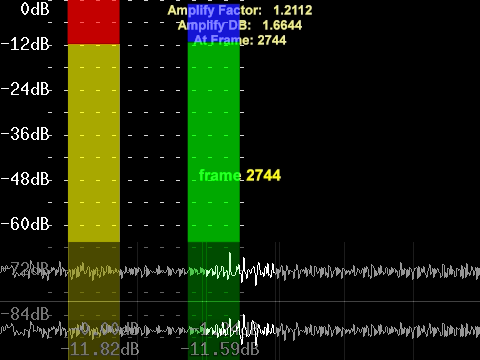
- (showing frame 2744, where the loudest peak was detected, but Amplify Factor is the same for all frames)

