Histograms in RGB & CMY: Difference between revisions
From Avisynth wiki
Jump to navigationJump to search
→Syntax and Parameters: formatting |
m abstract update |
||
| Line 1: | Line 1: | ||
{{FilterCat|External_filters|Adjustment_filters|Levels and Chroma}} | {{FilterCat|External_filters|Adjustment_filters|Levels and Chroma}} | ||
{{ | {{Filter3 | ||
|-Vit- | |-Vit- | ||
|2012/04/20 | |2012/04/20 | ||
|[http://avisynth.nl/images/Histograms_in_RGB_%26_CMY.avsi Histograms in RGB & CMY.avsi] | |[http://avisynth.nl/images/Histograms_in_RGB_%26_CMY.avsi Histograms in RGB & CMY.avsi] | ||
|Levels and Chroma | |Levels and Chroma | ||
|}} | | | ||
|6=[http://forum.doom9.org/showthread.php?p=1570968#post1570968 Doom9 Thread]}} | |||
<br> | <br> | ||
== Description == | == Description == | ||
:A script to display RGB and CMY levels and a RGB parade color scope | :A script to display RGB and CMY levels and a RGB parade color scope. | ||
<br> | <br> | ||
== Requirements == | == Requirements == | ||
Revision as of 12:45, 7 September 2014
| Abstract | |
|---|---|
| Author | -Vit- |
| Version | 2012/04/20 |
| Download | Histograms in RGB & CMY.avsi |
| Category | Levels and Chroma |
| License | |
| Discussion | Doom9 Thread |
Description
- A script to display RGB and CMY levels and a RGB parade color scope.
Requirements
- - AviSynth 2.5.8 or later
- - Supported color formats: RGB24, RGB32, Y8, YUY2, YV411, YV12, YV16, YV24
HistogramRGBLevels / HistogramCMYLevels
These two functions are like Histogram("levels") but for RGB and CMY instead of YUV.
- HistogramRGBLevels (clip input, bool "range", float "factor" )
- HistogramCMYLevels (clip input, bool "range", float "factor" )
- clip input =
- Input clip.
- clip input =
- bool range = true
- Set range=false to hide the 16-235 range (a left-over from the Y histogram used to build these)
- bool range = true
- float factor = 100.0
- The "factor" option specifies how the graphs are displayed. It is specified as percentage of the total population.
- Range: 0.0 to 100.0
- float factor = 100.0
HistogramRGBParade
Presents a fairly standard RGB parade color scope. It uses Histogram("classic") for each RGB component, but applied to columns rather than rows.
- HistogramRGBParade (clip input, float "width" )
- clip input =
- Input clip.
- clip input =
- float width = 0.25
- Controls the width of the histogram display (height will always be 256 pixels).
- float width = 0.25
Examples
- HistogramRGBLevels with default settings:
AviSource("blah.avi")
HistogramRGBLevels(range=true, factor=100.0)
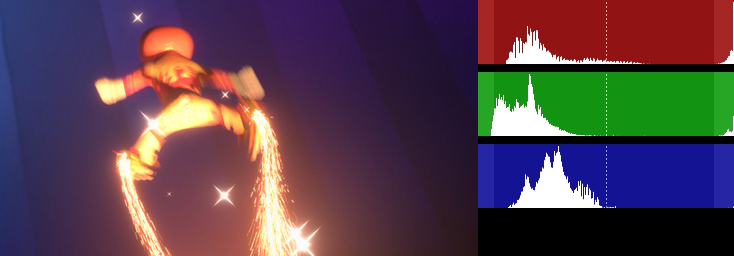

- HistogramCMYLevels with default settings:
AviSource("blah.avi")
HistogramCMYLevels(range=true, factor=100.0)
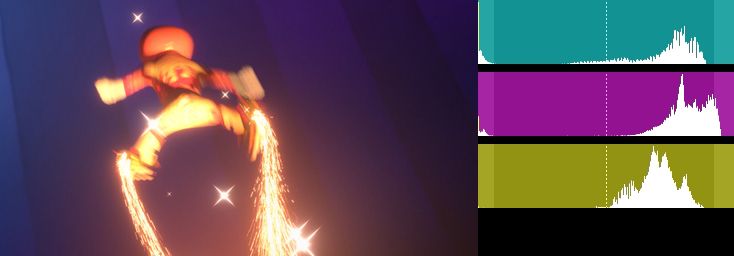

- HistogramRGBParade with default settings:
AviSource("blah.avi")
HistogramRGBParade(width=0.25)
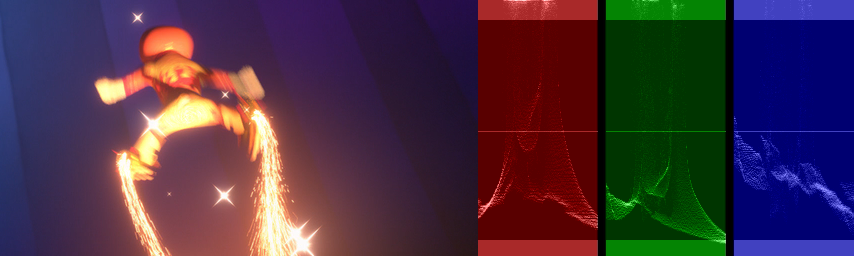

Changelog
Version         Date            Changes

2012/04/20      2012/04/20      - Initial release
Links
- Doom9 Forum - Histograms in RGB & CMY discussion.
Back to External Filters ←
