Limiter: Difference between revisions
No edit summary |
Swapped "autoscale" with paramscale which is the right parameter for scaling values automaticaly inside Limiter() |
||
| (15 intermediate revisions by 3 users not shown) | |||
| Line 1: | Line 1: | ||
<div style="max-width:62em" > | |||
The standard known as Rec.601 or [[Wikipedia:Rec._601|CCIR-601]] (''Studio Encoding Parameters of Digital Television...'') defines standard quantization levels: for luminance, black is '''16''' and peak white is '''235'''. This is the normal luminance range. For chrominance, the range is '''16''' to '''240''', or 128±112. "The signal may occasionally excurse beyond" these ranges according to Rec.601.<sup>[http://www.itu.int/rec/R-REC-BT.601/ BT.601-7] (Annex 1, Table 3)</sup> | |||
Luminance or chrominance values outside their ranges are [http://forum.doom9.org/showthread.php?p=1108323#post1108323 known to cause problems with some TV sets], so '''Limiter''' was created to ''clip'' them (or [[Talk:Levels#Clamping_vs._Clipping|''clamp'']] them - both terms are used) to the ranges [{{FuncArg|min_luma}}''', '''{{FuncArg|max_luma}}] and [{{FuncArg|min_chroma}}''', '''{{FuncArg|max_chroma}}], which you may specify, but by default are the Rec.601 values listed above. | |||
'''Limiter''' can also colorize out-of-range pixels (with {{FuncArg|show}}) to warn of a potential problem. See the [[#Examples|example images]] below. Naturally, this option should not be enabled for final output. | |||
{{AvsPluscon}} By default all parameters are ''non''-[[Autoscale_parameter|autoscaling]] – they must be scaled to the target bit depth.<br> | |||
By using parameter ''paramscale'' the range parameters are treated to be of 8 bits range and will be scaled to the current bit depth automatically | |||
</div> | |||
__TOC__ | |||
== Syntax and Parameters == | |||
<div style="max-width:62em" > | |||
{{Template:FuncDef | |||
|Limiter(clip ''clip'' [, int ''min_luma'', int ''max_luma'', int ''min_chroma'', int ''max_chroma'', string ''show'' ] ) | |||
}} | |||
<br>{{Template:FuncDef | |||
|{{AvsPluscon}} Limiter(clip ''clip'' [, float ''min_luma'', float ''max_luma'', float ''min_chroma'', float ''max_chroma'', string ''show'', bool ''paramscale'' ] ) | |||
}} | |||
{| | :{{Par2|clip|clip|(required)}} | ||
|- | ::Source clip. [[YUV]] only. | ||
| | ::{{AvsPluscon}} also supports [[YUVA]]. | ||
| "luma" | |||
| " | :{{Par2|min_luma|int|16{{Template:D}}}} | ||
| | ::''Y'' (luma) lower bound. | ||
| | |||
| | :{{Par2|max_luma|int|235{{Template:D}}}} | ||
| | ::''Y'' (luma) upper bound. | ||
:{{Par2|min_chroma|int|16}} | |||
::''U'' & ''V'' (chroma) lower bound. | |||
:{{Par2|max_chroma|int|240{{Template:D}}}} | |||
::''U'' & ''V'' (chroma) upper bound. | |||
:{{Par2|show|string|(empty)}} | |||
::Colorizes the pixels outside the specified [{{FuncArg|min_}}''X'', {{FuncArg|max_}}''X''] range. | |||
::If set, {{FuncArg|show}} must take one of the following values: | |||
::{| class="wikitable" style="width:40em;" | |||
!style="text-align:left;"| {{FuncArg|show}} | |||
!style="text-align:left;"| Effect | |||
|- | |||
|"luma" | |||
|''colorizes out of bound luma'' | |||
|- | |||
|"luma_grey" | |||
|''colorizes out of bound luma, and makes the remaining pixels grey'' | |||
|- | |||
|"chroma" | |||
|''colorizes out of bound chroma'' | |||
|- | |||
|"chroma_grey" | |||
|''colorizes out of bound chroma, and makes the remaining pixels grey'' | |||
|} | |||
::The colorizing is done as follows: | |||
::*[[YUY2]]: {{Serif|j}},{{Serif|k}}=1,2 (chroma shared between two horizontal pixels p1 and p2: Y1UY2V) | |||
::*[[YV24]]: {{Serif|j}},{{Serif|k}}=1 (no chroma shared) | |||
::*[[YV12]]: {{Serif|j}},{{Serif|k}}=11,12,21,22 (chroma shared between 2x2 pixels Y11UY12V: Y21UY22V) | |||
::{| class="wikitable" | |||
! style="text-align:left;width:12em;"| Pixel Condition | |||
! colspan="2"| Colorization | |||
|- | |||
| | |||
! style="text-align:left;width:12em;"| {{FuncArg|show}}="luma" | |||
! style="text-align:left;width:12em;"| {{FuncArg|show}}="luma_grey" | |||
|- | |- | ||
| | | ''Y''j < {{FuncArg|min_luma}} | ||
| | | {{BoldColor|#FF0000|120|♦}} red (pj) | ||
| | | {{BoldColor|#FF0000|120|♦}} red (pj) | ||
|- | |- | ||
| | | ''Y''j > {{FuncArg|max_luma}} | ||
| | | {{BoldColor|#00FF00|120|♦}} green (pj) | ||
| | | {{BoldColor|#00FF00|120|♦}} green (pj) | ||
|- | |- | ||
| ''Y''j < {{FuncArg|min_luma}} and ''Y''k > {{FuncArg|max_luma}} | |||
| {{BoldColor|#FFFF00|120|♦}} yellow (pj and pk) | |||
| {{BoldColor|#555501|120|♦}} puke (pj) {{BoldColor|#A0A04A|120|♦}} olive (pk) | |||
|- | |||
| | | | ||
| | ! style="text-align:left;"| {{FuncArg|show}}="chroma" | ||
| | ! style="text-align:left;"| {{FuncArg|show}}="chroma_grey" | ||
|- | |- | ||
| U < min_chroma | | ''U'' < {{FuncArg|min_chroma}} | ||
| yellow | | rowspan="8"| {{BoldColor|#FFFF00|120|♦}} yellow | ||
| yellow | | {{BoldColor|#FFFF00|120|♦}} yellow | ||
|- | |- | ||
| U > max_chroma | | ''U'' > {{FuncArg|max_chroma}} | ||
| | | {{BoldColor|#0000FF|120|♦}} blue | ||
| blue | |||
|- | |- | ||
| V < min_chroma | | ''V'' < {{FuncArg|min_chroma}} | ||
| | | {{BoldColor|#00FFFF|120|♦}} cyan | ||
| cyan | |||
|- | |- | ||
| V > max_chroma | | ''V'' > {{FuncArg|max_chroma}} | ||
| | | {{BoldColor|#FF0000|120|♦}} red | ||
| red | |||
|- | |- | ||
| U < min_chroma and V < min_chroma | | ''U'' < {{FuncArg|min_chroma}} and ''V'' < {{FuncArg|min_chroma}} | ||
| | | {{BoldColor|#00FF00|120|♦}} green | ||
| green | |||
|- | |- | ||
| U > max_chroma and V < min_chroma | | ''U'' > {{FuncArg|max_chroma}} and ''V'' < {{FuncArg|min_chroma}} | ||
| | | {{BoldColor|#008080|120|♦}} teal | ||
| teal | |||
|- | |- | ||
| U < min_chroma and V > max_chroma | | ''U'' < {{FuncArg|min_chroma}} and ''V'' > {{FuncArg|max_chroma}} | ||
| | | {{BoldColor|#FFA500|120|♦}} orange | ||
| orange | |||
|- | |- | ||
| U > max_chroma and V > max_chroma | | ''U'' > {{FuncArg|max_chroma}} and ''V'' > {{FuncArg|max_chroma}} | ||
| | | {{BoldColor|#FF00FF|120|♦}} magenta | ||
| | |} | ||
</div> | |||
:{{AvsPluscon}} {{Par2|paramscale|bool|false}} | |||
:: If set, minimum/maximum luma/chroma values are treated as they were in 8 bit range (but non-integer values are allowed), limiter will autoscale them to the current bit depth of the clip. | |||
:: Conversion uses the bit-shift method for integer bit depth conversion (from 8 to 8-16 bits). For 32 bit float clips the conversion is value/255.0 for Y (luma) channel and (value-128)/255.0 for U/V chroma channels. Do not use paramscale when you want to limit 32 bit float chroma exactly to +/-0.5, give the parameters directly instead. | |||
::Default: does not scale at all, parameters are used as-is. Parameters now are of float type to handle 32 bit float values.. | |||
== Examples == | |||
:{| | |||
| style="margin:0.5em;"| | |||
# 1. Original image | |||
[[FFmpegSource|FFmpegSource2]]("[http://www.sintel.org/ sintel].mp4") | |||
[[Trim]](4685, 4685) | |||
# 2. Exaggerated luma and chroma range | |||
[[Levels]](16, 1.0, 255-16, 0, 255, coring=false) | |||
[[Tweak]](sat=2.0, coring=false) | |||
# (''insert Limiter here'') | |||
ColorYUV(analyze=true) | |||
|- | |||
|[[File:Limit_Ex02.jpg]] | |||
|} | |||
:{| | |||
| style="margin:0.5em;"| | |||
# 3. Limiter("luma") | |||
[...] | |||
Limiter(16, 235, 16, 240, "luma") | |||
ColorYUV(analyze=true) | |||
|- | |||
|[[File:Limit_Ex03.jpg]] | |||
|} | |||
:{| | |||
| style="margin:0.5em;"| | |||
# 4. Limiter("luma_grey") | |||
[...] | |||
Limiter(16, 235, 16, 240, "luma_grey") | |||
ColorYUV(analyze=true) | |||
|- | |||
|[[File:Limit_Ex04.jpg]] | |||
|} | |||
:{| | |||
| style="margin:0.5em;"| | |||
# 5. Limiter("chroma") | |||
[...] | |||
Limiter(16, 235, 16, 240, "chroma") | |||
ColorYUV(analyze=true) | |||
|- | |||
|[[File:Limit_Ex05.jpg]] | |||
|} | |} | ||
:{| | |||
| style="margin:0.5em;"| | |||
# 6. Limiter("chroma_grey") | |||
[...] | |||
Limiter(16, 235, 16, 240, "chroma_grey") | |||
ColorYUV(analyze=true) | |||
|- | |||
|[[File:Limit_Ex06.jpg]] | |||
|} | |||
:{| | |||
| style="margin:0.5em;"| | |||
# 7. Putting it all together | |||
[...] | |||
[[StackHorizontal]]( | |||
\ Last | |||
\ , [[StackVertical]]( | |||
\ [[Histogram]]("levels", 0.5).[[Crop]](Width, 0, 256, 256).[[AddBorders]](0, 0, 0, Height/2-256) | |||
\ , Histogram("color2" ).Crop(Width, 0, 256, 256).AddBorders(0, 0, 0, Height/2-256) | |||
\ ) | |||
\ , StackVertical( | |||
\ [[BicubicResize]](Width/2, Height/2).Limiter(16, 235, 16, 240, "luma_grey") | |||
\ , BicubicResize(Width/2, Height/2).Limiter(16, 235, 16, 240, "chroma_grey") | |||
\ ) | |||
\ ) | |||
|- | |||
|[[File:Limit_Ex07a.png|768px]] | |||
|} | |||
== Changes == | |||
{| border="1" | {| border="1" | ||
|- | |||
| {{AvsPluscon}} r2724 | |||
| Added support for float. | |||
Added ''paramscale'' | |||
|- | |||
| {{AvsPluscon}} | |||
| Added support for 8-16bit color spaces. | |||
|- | |- | ||
| v2.60 | | v2.60 | ||
| Added | | Added support for YV24. | ||
|- | |- | ||
| v2.56 | | v2.56 | ||
| Added show to show out of bound luma/chroma. | | Added ''show'' to show out of bound luma/chroma. | ||
|} | |} | ||
[[Category:Internal filters]] | [[Category:Internal filters]] | ||
[[Category:Levels_and_Chroma_filters]] | |||
Latest revision as of 14:15, 25 September 2020
The standard known as Rec.601 or CCIR-601 (Studio Encoding Parameters of Digital Television...) defines standard quantization levels: for luminance, black is 16 and peak white is 235. This is the normal luminance range. For chrominance, the range is 16 to 240, or 128±112. "The signal may occasionally excurse beyond" these ranges according to Rec.601.BT.601-7 (Annex 1, Table 3)
Luminance or chrominance values outside their ranges are known to cause problems with some TV sets, so Limiter was created to clip them (or clamp them - both terms are used) to the ranges [min_luma, max_luma] and [min_chroma, max_chroma], which you may specify, but by default are the Rec.601 values listed above.
Limiter can also colorize out-of-range pixels (with show) to warn of a potential problem. See the example images below. Naturally, this option should not be enabled for final output.
AVS+ By default all parameters are non-autoscaling – they must be scaled to the target bit depth.
By using parameter paramscale the range parameters are treated to be of 8 bits range and will be scaled to the current bit depth automatically
Syntax and Parameters
Limiter(clip clip [, int min_luma, int max_luma, int min_chroma, int max_chroma, string show ] )
AVS+ Limiter(clip clip [, float min_luma, float max_luma, float min_chroma, float max_chroma, string show, bool paramscale ] )
- int min_luma = 16d
- Y (luma) lower bound.
- int max_luma = 235d
- Y (luma) upper bound.
- int min_chroma = 16
- U & V (chroma) lower bound.
- int max_chroma = 240d
- U & V (chroma) upper bound.
- string show = (empty)
- Colorizes the pixels outside the specified [min_X, max_X] range.
- If set, show must take one of the following values:
show Effect "luma" colorizes out of bound luma "luma_grey" colorizes out of bound luma, and makes the remaining pixels grey "chroma" colorizes out of bound chroma "chroma_grey" colorizes out of bound chroma, and makes the remaining pixels grey
Pixel Condition Colorization show="luma" show="luma_grey" Yj < min_luma ♦ red (pj) ♦ red (pj) Yj > max_luma ♦ green (pj) ♦ green (pj) Yj < min_luma and Yk > max_luma ♦ yellow (pj and pk) ♦ puke (pj) ♦ olive (pk) show="chroma" show="chroma_grey" U < min_chroma ♦ yellow ♦ yellow U > max_chroma ♦ blue V < min_chroma ♦ cyan V > max_chroma ♦ red U < min_chroma and V < min_chroma ♦ green U > max_chroma and V < min_chroma ♦ teal U < min_chroma and V > max_chroma ♦ orange U > max_chroma and V > max_chroma ♦ magenta
- AVS+ bool paramscale = false
- If set, minimum/maximum luma/chroma values are treated as they were in 8 bit range (but non-integer values are allowed), limiter will autoscale them to the current bit depth of the clip.
- Conversion uses the bit-shift method for integer bit depth conversion (from 8 to 8-16 bits). For 32 bit float clips the conversion is value/255.0 for Y (luma) channel and (value-128)/255.0 for U/V chroma channels. Do not use paramscale when you want to limit 32 bit float chroma exactly to +/-0.5, give the parameters directly instead.
- Default: does not scale at all, parameters are used as-is. Parameters now are of float type to handle 32 bit float values..
Examples
# 1. Original image
FFmpegSource2("sintel.mp4")
Trim(4685, 4685)
# 2. Exaggerated luma and chroma range
Levels(16, 1.0, 255-16, 0, 255, coring=false)
Tweak(sat=2.0, coring=false)
# (insert Limiter here)
ColorYUV(analyze=true)


# 3. Limiter("luma")
[...]
Limiter(16, 235, 16, 240, "luma")
ColorYUV(analyze=true)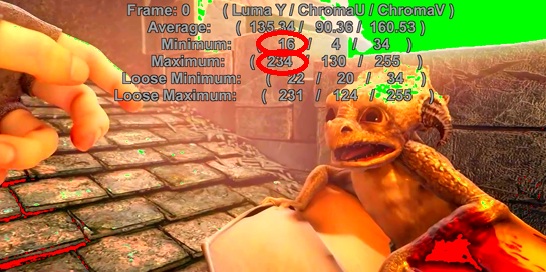

# 4. Limiter("luma_grey")
[...]
Limiter(16, 235, 16, 240, "luma_grey")
ColorYUV(analyze=true)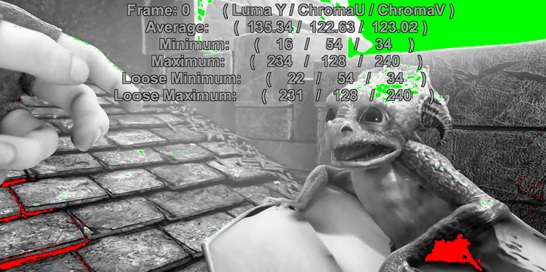

# 5. Limiter("chroma")
[...]
Limiter(16, 235, 16, 240, "chroma")
ColorYUV(analyze=true)

# 6. Limiter("chroma_grey")
[...]
Limiter(16, 235, 16, 240, "chroma_grey")
ColorYUV(analyze=true)

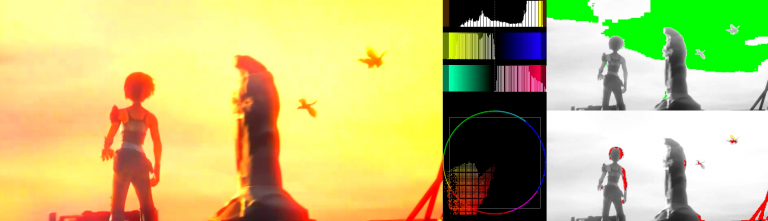
# 7. Putting it all together
[...]
StackHorizontal(
\    Last
\  , StackVertical(
\       Histogram("levels", 0.5).Crop(Width, 0, 256, 256).AddBorders(0, 0, 0, Height/2-256)
\     , Histogram("color2"     ).Crop(Width, 0, 256, 256).AddBorders(0, 0, 0, Height/2-256)
\    )
\  , StackVertical(
\       BicubicResize(Width/2, Height/2).Limiter(16, 235, 16, 240, "luma_grey")
\     , BicubicResize(Width/2, Height/2).Limiter(16, 235, 16, 240, "chroma_grey")
\    )
\ )

Changes
| AVS+ r2724 | Added support for float.
Added paramscale |
| AVS+ | Added support for 8-16bit color spaces. |
| v2.60 | Added support for YV24. |
| v2.56 | Added show to show out of bound luma/chroma. |
